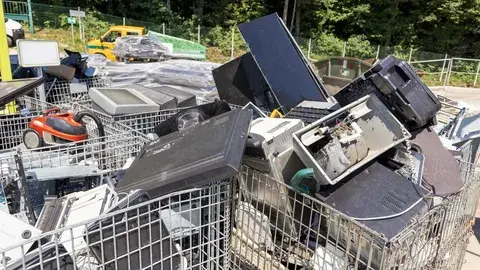
Office Equipment Disposal: Handling Outdated Computers and Electronics

Outdated computers, monitors, printers, and other office electronics can quickly accumulate when a business upgrades its technology or relocates. Disposing of these items requires more care than simply placing them beside a commercial dumpster because electronic components may contain hazardous materials and stored information may remain accessible. At Supreme Junk Removal & Services, responsible handling of unwanted equipment is an important consideration when businesses clear out their workspaces. Proper office equipment disposal helps organizations protect sensitive information, reduce unnecessary landfill waste, and prepare their offices for future use.
Key Takeaways
Separate reusable electronics from damaged or obsolete equipment before disposal.
Remove business data securely before donating, recycling, or transferring devices.
Use appropriate electronics recycling channels instead of ordinary trash collection.
Organize equipment by type to simplify handling and transportation.
Check local disposal requirements before arranging a large office cleanout.
Why Outdated Office Electronics Need Special Handling
Business technology often becomes obsolete before it stops working completely. A computer may no longer support current software, a printer might be incompatible with updated systems, or a monitor may not meet an organization's operational needs. These items can remain useful to another owner, but their value depends on condition, compatibility, and repair costs.
Electronics also contain materials that require appropriate processing. Circuit boards, batteries, wiring, and display components can include substances that should not enter ordinary waste streams. Improper disposal can create environmental concerns, particularly when electronic waste is broken apart, burned, or dumped where materials may contaminate soil and water.
The scale of the issue makes planning worthwhile. The United Nations' Global E-waste Monitor 2024 reported that the world generated approximately 62 million metric tonnes of electronic waste in 2022, while only 22.3% was documented as formally collected and recycled. Although this figure covers all electronic waste rather than office equipment alone, it highlights why businesses should consider reuse and responsible recycling before discarding outdated technology.
Preparing Computers and Electronics Before Disposal
The first step I recommend is creating an inventory of the equipment scheduled for removal. Record the type of device, its approximate age, operating condition, and whether it contains business information. This basic assessment helps determine which items may be reused, which need specialized handling, and which are ready for recycling. Professional appliance removal services can also help businesses sort unwanted equipment and identify items that require special disposal procedures.
Computers, laptops, external drives, and office servers deserve particular attention because they may store customer records, financial documents, employee information, passwords, or internal business files. Deleting visible files does not necessarily erase the underlying information. Businesses should use an appropriate data-sanitization process or have the storage media handled by a qualified provider.
Before removing a device, confirm that important files have been backed up and that the organization has approved its retirement. Disconnect accounts, revoke access where necessary, and document any equipment that contains confidential information. If a drive is damaged, do not assume it is safe simply because the computer no longer starts.
Accessories also need sorting. Keyboards, mice, docking stations, cables, and chargers may be reusable, while swollen batteries and damaged electrical components require separate attention. Keeping these items organized prevents usable accessories from becoming mixed with material destined for specialized recycling.
Reuse and Recycling Options for Businesses
Not every outdated computer belongs in a recycling bin. A device that still works reliably may be suitable for reuse, donation, refurbishment, or resale, provided the organization can remove its information securely and transfer it appropriately. This approach can extend the equipment's useful life and reduce demand for new electronic products.
For businesses exploring electronics recycling, I recommend checking whether local facilities accept the specific equipment involved. Some programs accept computers and monitors but apply separate rules to televisions, batteries, printers, or commercial electronics. Acceptance policies and fees can vary, so confirming details before transportation helps prevent rejected loads.
When equipment cannot be reused, a qualified electronics recycler may recover materials such as copper, aluminum, steel, and selected plastics. The actual recovery process depends on the device and the facility's capabilities. Businesses handling larger quantities should ask about documentation, downstream processing, and whether the provider follows recognized electronics-recycling standards.
Donation also requires care. Before transferring equipment to a school, nonprofit, or community organization, check that the devices remain functional, meet the recipient's needs, and can receive security updates. Giving away obsolete or unusable equipment without discussing its condition may simply shift the disposal problem to someone else.
Managing Office Cleanouts
Businesses in Park Rapids may need to remove outdated technology during office renovations, seasonal transitions, relocations, or changes in staffing. Planning the process around the building's access, equipment volume, and available storage space can make removal less disruptive to normal operations.
Winter weather in northern Minnesota introduces practical considerations for moving electronics. Equipment should be protected from snow, moisture, and sudden temperature changes during loading and transportation. When cold devices are brought into a warm building, condensation can develop, so they should be allowed to acclimate before being powered on again.
For organizations arranging commercial junk removal , it is useful to distinguish ordinary office furniture from electronics that require separate handling. Desks, shelving, and empty cabinets may follow different disposal routes from computers, batteries, and monitors. Keeping these categories separate makes it easier to coordinate collection and avoid accidental mixing.
Access should also be considered in advance. Offices may have narrow corridors, elevators, security-controlled rooms, or limited loading areas. Identifying these constraints helps determine how equipment should be packed and moved, especially when a cleanout involves heavy printers, server cabinets, or multiple workstations.
Common Mistakes to Avoid During Electronics Disposal
One frequent mistake is treating all electronic equipment as interchangeable waste. A desktop computer, a lithium-ion battery, a laser printer, and a damaged monitor may have different preparation and acceptance requirements. Checking these differences before collection helps reduce delays and handling risks.
Another mistake is focusing entirely on physical removal while overlooking information security. A computer can leave the premises without its data being properly sanitized. For businesses subject to privacy obligations, the disposal process should include an approved data-handling procedure and records showing what happened to storage devices.
I also recommend avoiding unnecessary dismantling. Removing components without the right training or tools can expose sharp edges, batteries, or other hazardous materials. Unless equipment is being processed by qualified personnel, keeping devices intact is generally the safer option.
Finally, businesses should not assume that a donation or recycling label guarantees responsible processing. Ask what equipment is accepted, how sensitive data is handled, and whether unusable items are sent to appropriate downstream facilities. Clear answers make it easier to evaluate the disposal option.
Planning a More Efficient Equipment Removal
A little preparation can make a large office cleanout easier to manage. Begin by setting a retirement date for each equipment group, then coordinate data removal, internal approvals, and transportation. If several departments are involved, designate one person to track which devices have been cleared and which still require review. For unwanted office appliances, arranging same-day appliance pickup can help businesses remove bulky equipment promptly and keep the cleanout on schedule.
For equipment that may be reused, test it before moving it into a donation or resale group. Confirm that power supplies and essential accessories are present, and note any known defects. This prevents time being spent transporting equipment that is no longer functional.
It is also worth keeping a basic record of the final destination of each group. Documenting which devices were reused, donated, recycled, or sent for specialized processing supports internal accountability. Businesses handling regulated or confidential information may need more detailed records based on their policies and applicable requirements.
Frequently Asked Questions
Can old office computers be placed in a regular dumpster?
Electronic equipment should not automatically be treated as ordinary trash. Computers and monitors may contain recoverable materials and components requiring special processing. Check local waste rules and use an appropriate recycling or collection option.
Should a business erase data before recycling computers?
Yes. The business should ensure that data is securely sanitized or that storage media is destroyed through an appropriate process before the equipment changes ownership. Simply deleting files or resetting a device may not meet the organization's security requirements.
Can outdated office electronics be donated?
Yes, when the equipment is functional, suitable for the recipient, and safe to transfer. Business information must be removed first, and the recipient should understand any limitations involving age, software support, or missing accessories.
What should happen to damaged batteries?
Damaged or swollen batteries should be kept out of ordinary trash and handled according to appropriate battery-safety and recycling procedures. Avoid puncturing, crushing, or attempting to dismantle them. If a battery is hot, leaking, or smoking, keep people away and contact the appropriate emergency service.
How can a company prepare for a large electronics cleanout?
Create an inventory, back up required files, sanitize storage devices, separate equipment by type, and confirm collection requirements in advance. Coordinating these steps reduces delays and makes it easier to identify equipment that can be reused or recycled.
Making Responsible Disposal Part of Office Planning
I view office equipment disposal as an important part of technology management rather than an afterthought at the end of an upgrade. Businesses that plan ahead can protect sensitive information, identify equipment suitable for reuse, and direct obsolete electronics toward appropriate processing channels. An organized approach also makes office relocations and workspace renovations easier to coordinate.
The most important steps are straightforward: assess the equipment, address data security, separate items by handling requirements, and confirm the destination before collection. These decisions help businesses manage outdated technology with greater care while reducing avoidable waste.
Arrange Your Office Equipment Removal
Preparing to clear outdated computers, monitors, printers, and other office items? Contact a local removal provider to discuss your equipment volume, building access, preferred schedule, and handling requirements. Before collection, ensure that confidential data has been securely removed and batteries or specialized electronics have been identified. Ask which materials can be accepted, whether separate recycling arrangements are needed, and how the collection will be coordinated. A clear plan helps your team reclaim workspace while keeping disposal responsibilities in focus.